How Vibe Coders Are Shipping AI Features 3x Faster: The Workflow Stack That's Replacing Traditional Dev Sprints
The vibe coding build loop — from idea to production in days, not sprints. Here's the exact tool stack, the workflow that replaces traditional dev cycles, and the honest truth about where AI saves time vs. where it creates debt.
Rori Hinds··9 min read
Here’s a number that should make you rethink your sprint planning: 46% of all new code is now AI-generated, up from 10% in 2023. And indie hackers using the right AI coding workflow are shipping 3-5x faster than teams running traditional two-week sprints.
Pieter Levels built fly.pieter.com — a browser-based flight simulator — solo with Cursor. It hit $1M ARR in 17 days. Not 17 months. Days.
This isn’t about code completion anymore. The vibe coding movement has created an entirely different build loop. One where a solo dev with the right stack can out-ship a five-person team stuck in Jira tickets and sprint ceremonies.
Once you’ve shipped, the next bottleneck is getting anyone to find your product. Check out the vibe coding SEO playbook for turning that build velocity into organic traffic.
Let’s break down exactly what that stack looks like, how the workflow actually runs, and — because nobody else seems willing to say it — where AI coding creates more problems than it solves.
The AI Coding Workflow Stack: What Actually Does What
The term “vibe coding” was coined by Andrej Karpathy in early 2025. He described it as “fully giving in to the vibes” — letting AI handle implementation while you focus on what to build, not how to build it.
But here’s what most guides miss: vibe coding isn’t one tool. It’s a stack where each tool handles a different layer of the build process. Get the layers right and the whole thing flies. Get them wrong and you’re just arguing with ChatGPT for three hours.
The vibe coding tool stack — each layer serves a specific purpose in the build loop
Layer
Tool
What It Actually Does
Verdict
Code Generation
Cursor
VS Code fork with AI built in. Composer mode writes across multiple files at once. The agentic mode plans and executes multi-step changes.
The real deal. $2B ARR for a reason.
Architecture & Refactoring
Claude Code
Terminal-based agent that reads your whole codebase. Strongest at multi-file refactoring and understanding existing code.
Best for codebases >5K lines.
UI Prototyping
v0 by Vercel
Describe a React component in plain English, get a working visual output. Drop it into Cursor and keep building.
Saves hours on frontend scaffolding.
Research & Specs
Perplexity / Claude
Research APIs, libraries, best practices before you start coding. Write specs and architecture docs.
Underrated step most people skip.
Deployment
Vercel / Railway
Push to GitHub, it deploys. Zero config for Next.js. Railway for anything needing a database.
Keep deployment boring.
Backend-as-a-Service
Supabase
Postgres + auth + storage + API, all managed. Skip the infra setup entirely.
Standard choice for vibe-coded MVPs.
The $74/month solo stack
Cursor Pro ($20) + Claude Pro ($20) + Supabase free tier + Vercel free tier + Perplexity Pro ($20) + a domain ($14). That's a full production-grade build environment for less than one freelance developer hour.
If you’ve been weighing which AI coding assistant to use, the short answer: Cursor is the default for a reason. It has 7M+ monthly active users and generates roughly 1 billion lines of code per day. But it’s strongest when paired with Claude Code for refactoring and architecture decisions — they complement each other better than either works alone.
The New Build Loop: Idea to Production Without Sprint Overhead
Traditional dev sprints were designed for teams. Standups, ticket grooming, sprint planning, retros — that’s coordination overhead for 10+ people. When you’re a solo founder or a team of two, all that process is just friction.
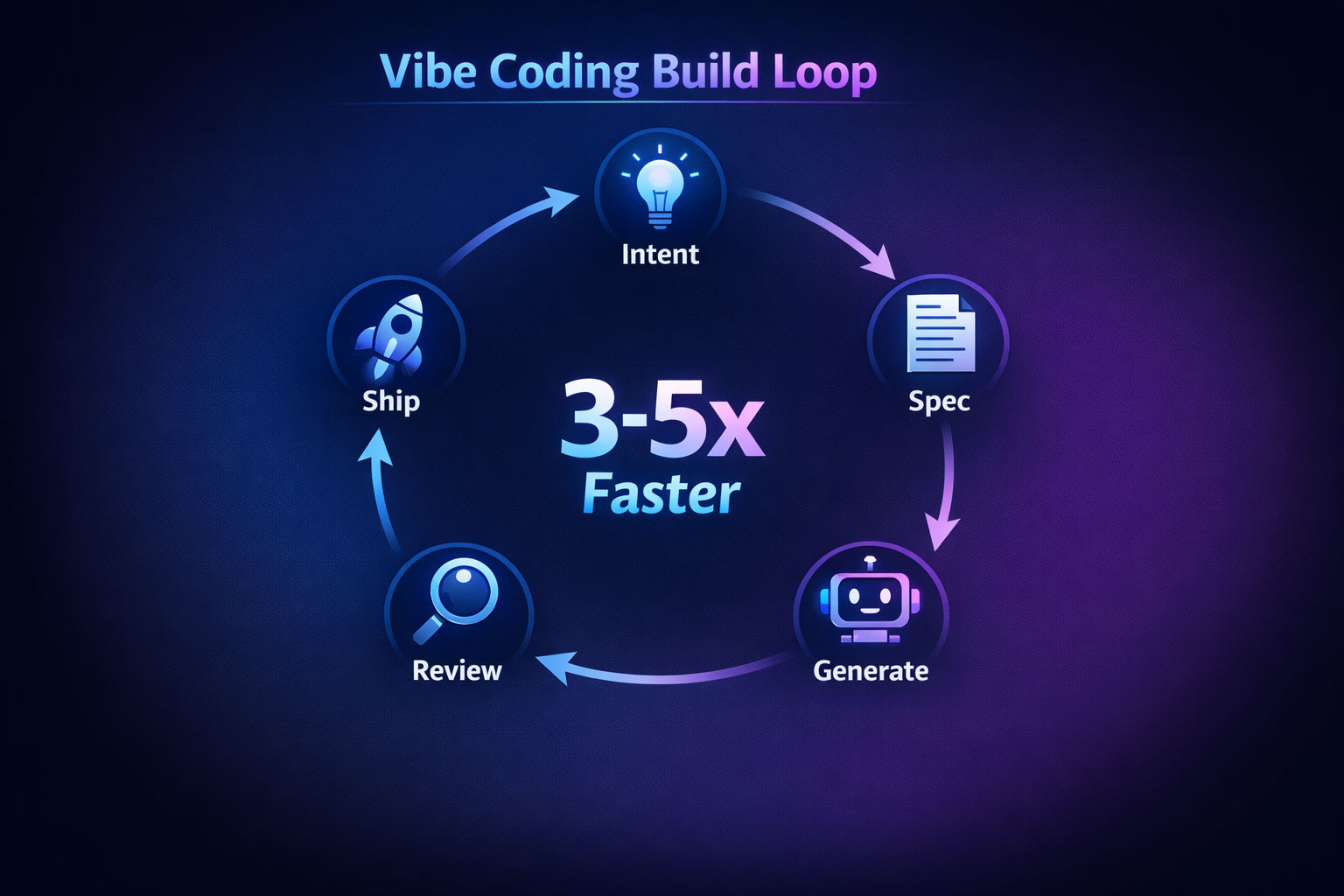
The vibe coding build loop replaces it with something tighter:
The vibe coding build loop
Step 1
Intent (10 min)
Describe what you're building and why. Use Claude or Perplexity to research the problem space, existing solutions, and APIs you'll need. Don't touch code yet.
Step 2
Spec (20 min)
Write a structured spec in your AGENTS.md or .cursor/rules file. Include: features, constraints, tech stack, database schema, edge cases. This is the single biggest predictor of output quality — garbage spec, garbage code.
Step 3
Generate (1-3 hours)
Open Cursor Composer. Scaffold the project, then build feature-by-feature. Use v0 for UI components, then drop them into Cursor. Work in small, reviewable chunks — not one massive prompt.
Step 4
Review (30-60 min)
Read every line the AI wrote. Check for security holes (unauthenticated endpoints, missing input validation), unnecessary complexity, and code that works but is unmaintainable. This step is non-negotiable.
Step 5
Ship (15 min)
Push to GitHub. Vercel or Railway auto-deploys. Your MVP is live in the time it takes to write a sprint planning agenda.
The build loop that's replacing two-week sprints for solo founders
Compare that to the traditional path: two days of sprint planning, a week of development, two days of QA, a deploy meeting. For the same feature, you’ve burned two weeks of calendar time.
This is why indie hackers are out-shipping funded startups. Not because they’re better engineers — because they’ve cut the process fat.
Where AI Actually Saves Time (And Where It Creates Debt)
Here’s where most vibe coding content gets dishonest. They show you the happy path — the prototype built in an afternoon — and skip the part where you spend three days debugging AI-generated authentication logic that looked correct but wasn’t.
The data tells a more complicated story.
AI time savings vs. time costs — the real picture
Where AI Saves Time
Where AI Creates Debt
Scaffolding projects and boilerplate (90% faster)
Security — 45% of AI code contains flaws (Veracode 2025)
UI component generation via v0 and Cursor
Code churn is 41% higher with AI-generated code
Writing tests from existing code
Code duplication rose from 8.3% to 12.3% in major repos
Database schema and API route generation
63% of devs spend MORE time debugging AI code
Refactoring with Claude Code (multi-file)
AI-generated tests validate AI assumptions, not real edge cases
Deploy configs and CI/CD setup
Trust in AI code dropped from 77% to 60% year-over-year
Coding agents basically didn't work before December and basically work since. These agents are extremely disruptive to the default programming workflow.
Karpathy’s right that the tools have crossed a capability threshold. But here’s the uncomfortable truth: 41% of developers push AI-generated code to production without full review. That’s not productivity — that’s borrowing against your future self.
The smart approach is to use AI heavily for the parts where mistakes are cheap (scaffolding, prototyping, boilerplate) and stay hands-on for the parts where mistakes are expensive (auth, payments, data integrity).
If you’re building a SaaS you intend to sell, the “just ship it” mentality needs a guardrail. One experienced practitioner put it well: treat AI output like a “supercharged junior developer who never sleeps” — fast, tireless, but needs code review on every PR.
The Hidden Cost: Context Management Is the Real Bottleneck
Here’s something nobody warns you about until you’ve hit the wall: the hardest part of the AI coding workflow isn’t generating code. It’s managing context.
AI models forget. Every new chat starts from zero. And as your codebase grows past a few thousand lines, you start spending more time explaining your project to the AI than actually building.
This is why AGENTS.md has become the standard for 2026. It’s a markdown file in your repo root that gives AI tools persistent context about your project — tech stack, coding conventions, file structure, business logic. Cursor has its own version with .cursor/rules/*.mdc files.
When to NOT use AI
Skip AI coding for: payment logic (Stripe webhooks, billing state machines), auth flows beyond basic setup, data migrations on production databases, and any code where a subtle bug costs you money or users. The 30 minutes you save isn't worth the 3-day debugging session when a race condition hits production at 2am.
An ETH Zurich study from early 2026 found that AGENTS.md files often add unnecessary steps that increase token costs by over 20% without improving output quality. The fix? Keep your context files tight. Write rules based on actual AI mistakes you’ve observed, not hypothetical edge cases.\n\nBest practices that actually work:\n\n- Start with 10-15 rules max — add more only when you see repeated mistakes\n- Use specific before/after code examples instead of abstract descriptions\n- Scope rules to file types using globs (e.g., auth rules only load for auth files)\n- Commit your rules to Git so they’re versioned and shared across your team\n- Reference files, not full contents — let the AI pull what it needs\n\nAnd before you ship, make sure you understand what actually breaks when vibe code hits production — 45% of AI-generated code has security vulnerabilities that surface right after launch.
Skip AI coding for: payment logic (Stripe webhooks, billing state machines), auth flows beyond basic setup, data migrations on production databases, and any code where a subtle bug costs you money or users. The 30 minutes you save isn’t worth the 3-day debugging session when a race condition hits production at 2am.
Your Move: How to Adopt This Without Burning Down Your Codebase
If you’re already using Cursor or a similar tool for code completion, you’re only capturing about 30% of the possible speed gains. The other 70% comes from optimizing the full loop — research, specs, context management, and knowing when to code manually.
Here’s what I’d do this week:
Set up your AGENTS.md with your tech stack, conventions, and 10 specific rules based on your most common AI mistakes
Add v0 to your UI workflow — stop prompting Cursor for component designs and use the right tool for visual work
Time your next feature end-to-end using the Intent → Spec → Generate → Review → Ship loop. Compare it to your last sprint-based feature
Draw your “AI boundary” — decide now which parts of your codebase are AI-assisted and which stay human-written
The vibe coding movement isn’t slowing down. Gartner predicts 60% of new code will be AI-generated by end of 2026. The question isn’t whether to adopt this workflow — it’s whether you’ll do it with discipline or end up in the 63% spending more time debugging than building.
The founders making the most of this era are shipping fast and growing smart. If you want to see what that looks like in practice — from first commit to first $1K MRR — the zero to $1K MRR data on vibe coders is worth reading alongside this.
If you’re shipping a SaaS and haven’t optimized your content strategy alongside your build velocity, you’re leaving growth on the table. Shipping fast means nothing if nobody finds your product.
Ship your blog as fast as you ship your code
You've optimized your dev workflow. Now automate the other bottleneck. Vibeblogger handles your entire blog — research, writing, SEO, and publishing — so you can focus on building.